Funny Weather: Rude Forecast
- 4.3
- Rating
- 100.00K
- Installs
- Free
- Price
 Analysis by App-foxy
I enjoy weather apps that tell me what I actually need without turning a simple forecast into a chore. Funny Weather: Rude Forecast takes a different route: it combines an ordinary weather forecast with jokes that are deliberately cheeky, so checking the sky becomes a small entertainment break rather than a purely practical task. In my experience, that personality is the reason to try it, but it is also the reason some people will quickly move on.
This is a free weather app from epsilon ventures LLC, available for Android users running at least version 6.0. It has reached more than 100 thousand installs and holds an average rating of 4.3 from roughly 3.7 thousand ratings, which suggests that its unusual tone has found a real audience. The app is rated Mature 17+, and that matters: the humor is not designed for children or for workplaces where a blunt joke appearing on screen could be awkward.
I would describe it as a companion to a conventional weather tool rather than a complete replacement for every weather service. It can make a routine glance more memorable, especially when I am deciding whether to carry an umbrella or change plans. However, anyone looking for a serious meteorological dashboard, detailed storm tracking, or a calm family-friendly interface should approach it with different expectations.
You May Also Like

 Blood Strike: 2.5 Anniversary
Blood Strike’s Loadouts Turn Every Drop Into a Tactical Gamble
A close look at Blood Strike’s custom loadouts: how fast access to signature weapons reshapes its battle royale rhythm, rewards preparation, and narrows the gap between fights.

 Pandora - Music & Podcasts
Pandora’s Music Is Easy to Start, but Harder to Recover
Pandora’s strength is its low-effort path from a seed to a station. Its weak spot is how much confidence it asks you to place in connection, setup, and quiet recovery.

 8 Ball Pool
 Is Built on Rivalries, Rematches, and Routine
A close look at the rivalries, rematches, shared routines, and unanswered safety questions that turn a quick pool match into a persistent mobile community.

 Samsung Music
’s Quiet Strength Is Playing What You Already Own
Its reach comes less from spectacle than from dependable access to a personal library. That simplicity is both the app’s strongest retention engine and its ceiling.

 AccuWeather: Weather Radar
AccuWeather Review: A Quick, Clear Forecast for Everyday Decisions
For everyday plans, the best forecast is the one you can understand quickly. AccuWeather makes rain timing, radar, and local conditions easy to act on, with a few trade-offs.

 Hill Climb Racing
Why Hill Climb Racing Still Turns Crashes Into One More Run
A tiny car, a bumpy hill and one more upgrade: Hill Climb Racing keeps resurfacing because its simple chaos makes every near-miss feel personal.
More From Our News Desk
View All News


When the forecast depends on a connection
When I think about a weather app’s connection needs, I focus on the moment a quick glance turns into a decision: leaving home, changing a plan, or checking conditions in a new place. This section looks at how I’d judge whether the forecast is current enough to act on, rather than treating a screen that happens to open as proof. That distinction becomes especially useful when the signal is patchy.
The useful part and the entertaining part arrive together
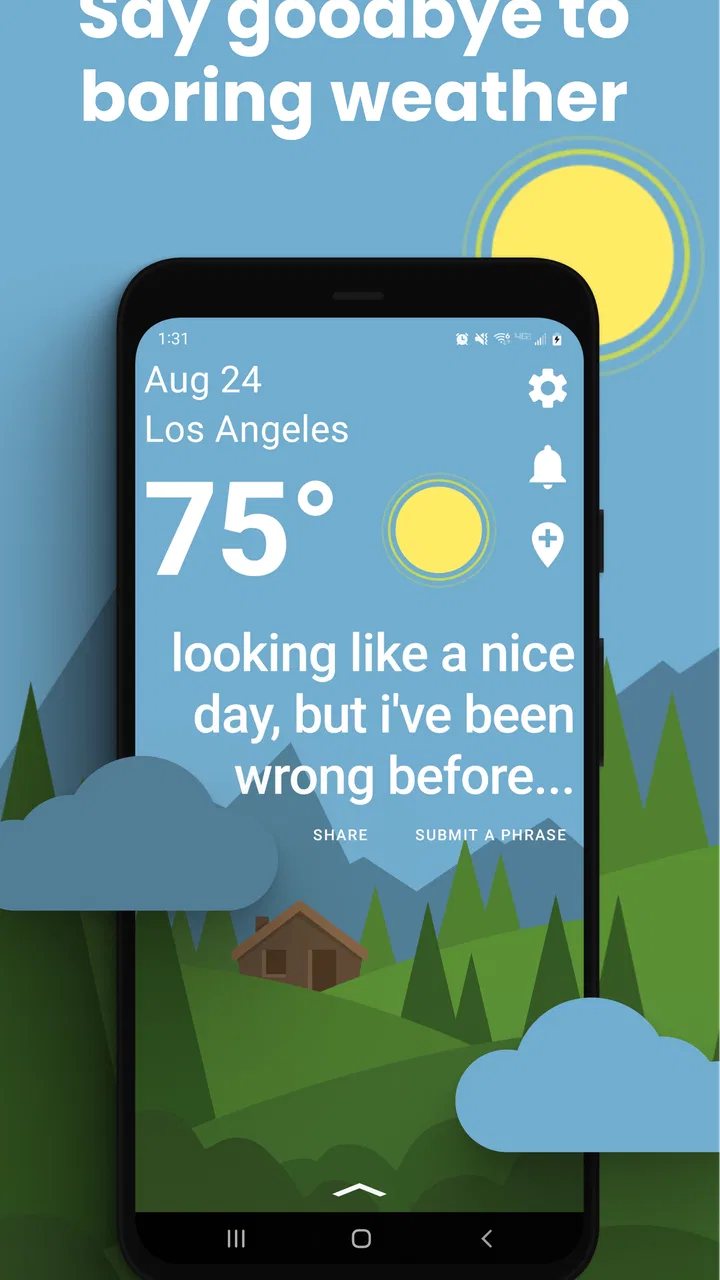
The central experience is straightforward: the app presents the forecast alongside a joke weather message. That pairing works because the practical information remains the anchor. I can look for the expected conditions first, then enjoy the rude commentary if I am in the mood. The joke does not need to replace the forecast; it gives the routine a little character.
That design also makes connectivity important. A weather app needs current information to be useful, and this one is built around checking what the weather is like now or what it may be like later. When I open it in a normal connected setting, such as at home before leaving, the experience makes sense: I check the conditions, read the humorous line, and decide what to wear or pack.
The network-dependent nature of weather checking is easy to overlook when everything works. A forecast can feel instant, but it still depends on information being retrieved and displayed. I would not treat this app as my only preparation tool before a long trip into an area where service may be unreliable. The sensible habit is to check important weather conditions before leaving a dependable connection, especially if the day involves driving, hiking, boating, or outdoor work.
There is a subtle trade-off here. The joke makes me more likely to open the app casually, even when I am not urgently checking the forecast. That can be pleasant, but it also means I am using it as a small content experience, not just as a utility. If I only want a notification or a silent glance at temperature, a more conventional weather app may fit my routine better.
Why the tone changes the way I check weather
Most weather apps encourage a quick scan of numbers, icons, and maps. Funny Weather adds a reason to linger for a moment. I found that useful when weather checking had become automatic and forgettable. The joke gives the forecast a recognizable voice, which can make an otherwise dull morning feel less repetitive.
That personality is not universally helpful. The humor can be distracting when I am trying to make a fast decision, and the Mature 17+ rating signals that the language or subject matter may not suit everyone nearby. I would be careful opening it during a presentation, around young children, or when handing my phone to someone who expects a standard weather screen.
My practical tip is to use the app for low-pressure checks and keep a more conventional source available for serious planning. That is not a criticism of the concept; it is simply the best way to respect what this app does well. Its strength is making a forecast entertaining, not turning a phone into a professional weather station.
What happens when the connection is weak
In a weak-signal situation, I would expect the experience to become less dependable because the value of a current forecast is tied to receiving current information. I would not assume that a previously viewed forecast remains accurate just because it is still visible. Weather changes, and an old screen can create false confidence.
If the app does not load as expected, my first response would be practical rather than repeatedly tapping the screen: move to a stronger signal, reopen the app, and compare the result with another trusted weather source when the decision is important. This is especially relevant for severe conditions, where a funny line should never be treated as a warning system.
The app's humor can make a failed refresh feel less serious than it is. That is one of the hidden trade-offs of a playful interface: it lowers the emotional weight of the check, but it may also encourage casual assumptions. I recommend treating the forecast as the factual part and the joke as commentary. If the factual part cannot be confirmed, wait for a reliable connection before making a weather-sensitive decision.
Using it in everyday mobile situations
For everyday mobile use, the useful question is not just whether I can open the app, but when and where a forecast check fits safely into the day. I’ll consider how I’d handle short checks before a commute, while out running errands, and when sharing the screen with someone else. Those situations also show why a funny forecast is best enjoyed when I have a moment to read it, not while attention belongs elsewhere.
A morning commute example
Imagine checking the forecast while getting ready for work. I might open the app beside the front door, see that rain is expected, and decide to take a jacket and umbrella. The rude remark adds a quick laugh, but the real benefit is that the forecast has prompted a concrete action. If the connection is stable, this is exactly the kind of small daily use where the app feels natural.
On a commute, the situation changes. I would not recommend trying to read jokes or study a forecast while walking through traffic or driving. The app is better used before setting off or after arriving. Its entertainment layer is a reason to look at the screen, not a reason to increase screen time in an unsafe context.
For people who plan their day around outdoor conditions, the app can work as a first glance. A dog walk, casual bike ride, lunch outside, or weekend errand can all benefit from a quick check with a bit of personality. For farmers, event organizers, outdoor crews, or travelers making high-stakes decisions, I would use a more specialized service alongside it.
Sharing the moment with other people
The app's tone also changes how it works socially. A funny forecast can be something I show a friend, particularly when the weather is absurdly hot, cold, wet, or unpleasant. That makes it more memorable than a neutral icon, and it gives the app a small social value that ordinary weather tools often lack.
Still, the Mature 17+ rating is not a minor detail. I would not assume every joke is suitable for a family group chat, a classroom, or a shared office screen. If I want to show it to someone, I would check the wording first rather than handing over the phone without warning. That is a practical limitation created by the app's identity, not a technical flaw.
It is also worth considering who controls the phone in a household. A parent looking for a weather app for a child should skip this one and choose a service with an all-ages presentation. An adult who enjoys irreverent humor may find the same choice refreshing. The right answer depends less on forecast habits than on comfort with the app's voice.
Travel and changing locations
For travel, I would use Funny Weather as a quick local check after arriving somewhere, provided I have a reliable connection. It can make the unfamiliar routine of checking a new place feel less sterile. Before departure, though, I would check the destination and any important route conditions in a dependable weather service as well.
The reason is not that the app's concept is inadequate; it is that travel magnifies the cost of uncertainty. A missed train, delayed flight, mountain road, or outdoor reservation may require more detail than a compact humorous forecast is intended to provide. The app is most comfortable when it answers, “What should I expect right now?” rather than, “How do I manage a complicated weather-dependent plan?”
I also would not rely on the app as a substitute for official emergency information. A joke can coexist with ordinary weather awareness, but it should never be confused with an alert, warning, or specialist assessment. That distinction is important for anyone who is tempted to use one app for every weather-related decision.
Failure, recovery, and the cost of checking again
A failed check can cost more than a few extra taps if I am relying on the result to make plans. Here I’ll look at a sensible stopping point for troubleshooting, when I’d switch to another source, and how I’d avoid mistaking a delayed screen for reliable current conditions. The goal is to recover efficiently without letting the app’s light tone make an important weather decision feel casual.
A simple recovery routine
When a weather app behaves unexpectedly, I prefer a short recovery routine. First, I check whether other apps can reach the internet. If they cannot, the issue is probably the connection rather than the forecast service. If other apps work, I close and reopen Funny Weather, then try again from a stronger signal if possible.
If the forecast still does not appear correctly, I would avoid repeatedly refreshing while moving through an area with poor reception. That wastes time and may use more mobile data without improving the result. For an important decision, I would switch to a trusted alternative rather than waiting indefinitely for a joke-centered weather app to recover.
This workflow is more important than it may sound. The app encourages casual use, so it is easy to treat a failed check as harmless. But the forecast may be the basis for clothing, travel, or outdoor safety. My rule is simple: if the weather matters, recovery should end with confirmed information, not merely a screen that eventually opens.
Where the playful design can create friction
The biggest possible friction is expectation. Someone installing a weather app may expect rich maps, detailed hourly breakdowns, radar, alerts, or a dense technical view. The store summary emphasizes the combination of forecast and jokes, so I would not choose this app hoping for the full toolkit of a specialist service.
Another issue is that humor has a short novelty cycle for some users. I enjoyed the idea more when I wanted a change from bland weather screens, but people who prefer quiet, predictable interfaces may find the commentary irritating after repeated checks. A joke that feels funny once may feel like clutter when I am checking conditions several times in a day.
The app also includes optional purchases priced from $1.99 to $29.99 per item. Because it is free to install, I would begin with the no-cost experience and decide later whether any paid extras genuinely improve my routine. I would not pay simply because the concept is amusing; the purchase should solve a real annoyance or add value I will use repeatedly.
Keeping the forecast separate from the joke
One of my most useful habits with this app is to read the factual weather information first and the humorous text second. That keeps the decision-making process clear. I can enjoy the personality without letting it blur whether I need a coat, whether rain is likely, or whether outdoor plans deserve reconsideration.
This separation is especially valuable when sharing the app with someone else. If I show a funny line without explaining the actual forecast, the entertaining part can become the entire takeaway. A quick statement such as “the joke is extra; check the conditions above it” keeps the app in its proper role.
That may sound obvious, but it is the difference between using Funny Weather responsibly and treating it as a novelty screen. The app works best when the humor improves attention rather than replacing judgment.
Data-conscious use on mobile
Mobile data is easiest to manage when I decide what I need to learn before opening a weather app. I’ll explain how I’d keep casual curiosity from turning into repeated checks, while still making room for a quick forecast when it can change what I pack or do. This also leads into the practical trade-off between conserving resources and getting dependable information when the weather matters.
When I would use Wi-Fi
For ordinary home or office checks, I would use Wi-Fi when it is available, particularly if I am opening the app repeatedly out of curiosity rather than necessity. A single weather check is usually a small action, but habits add up. The more often an app is opened for entertainment, the more sensible it is to be aware of the connection being used.
I would also avoid repeatedly reopening the app just to see whether the joke changes. That is not a criticism of the humor; it is a reminder that a playful weather tool can encourage extra checks. If I am conserving mobile data or battery, I would check once before leaving and rely on the practical information rather than turning the app into a constant companion.
Using mobile data with a purpose
When I am away from Wi-Fi, the app still makes sense for a quick decision: whether to bring rain protection, change clothing, or postpone a casual outdoor activity. I would open it with a clear question, read the forecast, and close it. That approach keeps the experience efficient and avoids treating every spare moment as an invitation to refresh.
For longer trips, I would plan around connectivity instead of assuming that a weather app will always be ready. Checking key conditions before entering a weak-signal area is a better habit than discovering the limitation when I am already outside. I would also keep another source in mind for serious conditions, because data-conscious use should not become information-poor use.
The important trade-off is convenience versus confidence. Funny Weather is convenient when the network is available and the question is simple. Confidence requires more care when the location is changing, the forecast is critical, or the connection has been unstable. Recognizing that boundary is more useful than pretending one app can cover every situation.
Who should install it and who should skip it
I think it is a good fit for adults who want a lighter, more irreverent way to check everyday weather. It is particularly appealing if standard forecast apps feel interchangeable and you enjoy a little humor during routine tasks. The free entry point makes it easy to test without committing money immediately.
I would skip it if I need a professional-style weather workspace, if I dislike rude humor, or if children will regularly use the device. I would also choose something else as my primary tool for severe-weather preparation, detailed travel planning, or situations where a current connection cannot be assumed.
The developer, epsilon ventures LLC, has positioned the app around a very specific experience rather than trying to make it everything at once. That focus is its charm. It also means the app should be judged as a humorous forecast companion, not against every feature offered by large, information-heavy weather platforms.
My connectivity verdict
After using Funny Weather: Rude Forecast, I see it as a small daily mood lift built around a practical need. The forecast gives the app a reason to exist, while the jokes give it a personality that can make checking the weather less mechanical. When I have a reliable connection and only need a quick local read, it is easy to recommend to the right kind of user.
Its limitations are equally clear. The experience is less suitable when connectivity is uncertain, when weather decisions carry serious consequences, or when I need detailed specialist tools. The Mature 17+ rating narrows its audience, and the optional purchases mean I would evaluate extras carefully rather than assuming every addition is necessary.
The current version is 10.3.0, and the app is free with optional in-app purchases. Those details make it low-risk to try, but the real decision is about tone. If you want a calm, technical, all-purpose weather dashboard, look elsewhere. If you want a forecast that can make an ordinary commute check feel a little more human—and you are comfortable separating the joke from the actual information—this is a distinctive choice.
My final advice is to install it for casual connected checks, keep a dependable alternative for important plans, and let the humor remain what it does best: an entertaining layer over a simple weather routine. The best way to use it is to enjoy the attitude without outsourcing your weather judgment to it.
FAQs for Funny Weather: Rude Forecast
01What is Funny Weather: Rude Forecast?
Funny Weather: Rude Forecast is a weather app that presents daily forecasts with sarcastic, humorous, and sometimes deliberately rude comments. Instead of showing weather information in a completely formal style, it adds personality to temperature readings, conditions, and forecasts. It is designed for users who want a quick weather check with entertainment included, although its jokes may not appeal to everyone.
02Is Funny Weather: Rude Forecast accurate and reliable?
The app’s usefulness depends on the weather data provider, your location settings, and how frequently the information is updated. It can be convenient for checking general conditions, temperatures, and upcoming forecasts, but users should not rely on its humorous commentary for severe-weather decisions. For storms, warnings, or safety planning, compare the information with an official meteorological service.
03Does Funny Weather: Rude Forecast require location access?
The application may request permission to access your location so it can automatically display weather conditions for your current area. You can usually choose whether to allow location access while using the app, deny it, or enter a city manually if that option is available. Review the permission request carefully, particularly if you prefer not to share location data.
04Is Funny Weather: Rude Forecast free to download and use?
Availability and pricing can vary depending on the Android or iOS version and the developer’s current business model. The app may be free to install while including advertisements, optional purchases, or premium features. Before downloading, check the store listing for subscription details, in-app purchase prices, advertising information, and whether any features are restricted behind a payment.
05Is Funny Weather: Rude Forecast suitable for children or professional use?
The app is primarily intended for adults and older users who enjoy sarcastic humor. Its rude wording, jokes, or occasional profanity may not be appropriate for children, classrooms, workplaces, or users who prefer a neutral weather experience. It is also better viewed as an entertaining forecast tool rather than a professional weather instrument, especially when accurate alerts are important.
Pros
- Playful forecasts make routine weather checks more entertaining.
- Quick-glance layout makes key conditions easy to find.
- Useful daily information includes temperature and precipitation details.
- Humorous wording gives the app a distinctive personality.
- Lightweight design should work well on most modern devices.
Cons
- The rude humor may not appeal to children or all audiences.
- Forecast accuracy depends on the quality of the selected weather source.
- Some jokes may become repetitive after frequent use.
- Weather details may feel limited for users needing advanced data.
- Potential notifications can become annoying if not carefully configured.

Funny Weather: Rude Forecast
Gallery